
Building Inspections
The Building Inspection Division conducts inspections of new construction, remodels, and trades (electrical, mechanical, and plumbing) to ensure compliance with applicable building codes. After you activate your permits, you will coordinate each stage of construction with the appropriate inspections and applicable City departments (see One-Time Inspections). Inspections are the final steps in the development and permitting process and ensure that everything is built as approved and in compliance with public health and safety regulations.
An inspection may be conducted during construction or upon completion of the permitted work, but it is up to the contractor to schedule it. Inspections can be scheduled online via the AB+C Portal or by phone. Depending on the scope of work, a final inspection may result in the issuance of a Certificate of Occupancy, which confirms that a structure is safe for occupancy. Visit the Certificate of Occupancy webpage for information on obtaining a Certificate of Occupancy (CO) or a Temporary Certificate of Occupancy (TCO).
For general questions or emergency inspections, please email Building Inspections.
What you will find on this page:
Schedule an Inspection
You can schedule an inspection online or by phone. Visit the Schedule a Building Inspection webpage to learn more.
- Inspection Hours
Regular Business Hours
Monday-Friday, 7 a.m. to 3 p.m.
Emergency Inspections
Emergency inspections are available 24/7. Please visit the Permits for Emergency Repairs webpage for more information.
Note: Inspections are usually performed 24 hours after scheduling, but an inspector’s workload can delay a scheduled inspection until the next business day or 48 hours after scheduling.
General
- Resources
- Find Your Inspector - search by address, find inspectors and contact information.
- Printing Approved Plan Set
The permit holder and owner-general contractor must ensure that a paper copy of the approved plan set is available on-site for review by the City inspections staff. Failure to provide the City-approved set of plans may result in failed inspections and delays in receiving a Temporary Certificate of Occupancy or Certificate of Occupancy.
Locating Active Permits
Approved plan sets can be downloaded from the Austin Build + Connect (AB+C) Portal using your AB+C Portal account or Public Search. To locate using Public Search you will need the Plan Review (PR) number or address.
Step 1: Visit the AB+C Portal
Navigate to Public Search on the AB+C Portal . Click the AB+C ‘Public Search’ option on the top right corner of the page.

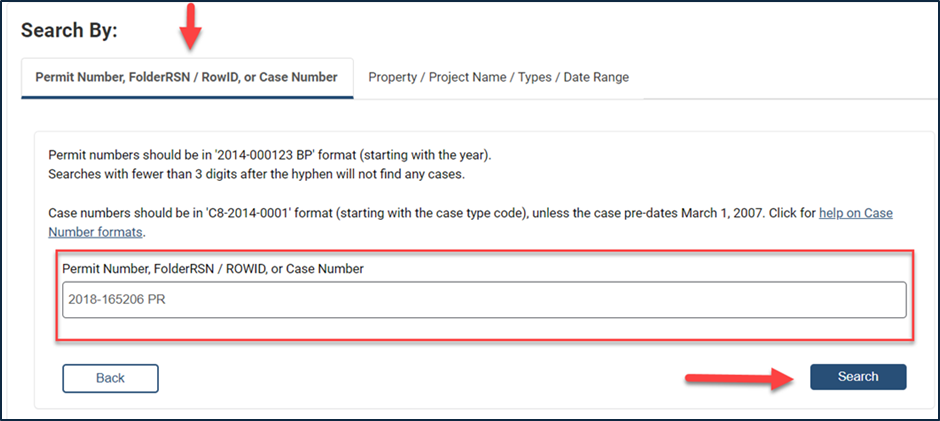
Step 2: Search for your PR numberIn the "Search By" tab, enter your Plan Review (PR) number and click the "Search" button.
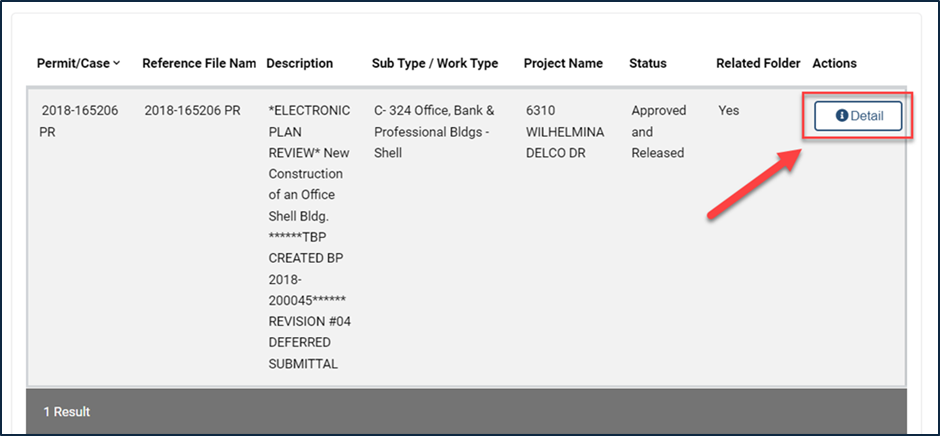
Step 3: Select Permit/Case NumberSelect the applicable Permit/Case number associated with your scope of work and click into the permit "Detail".
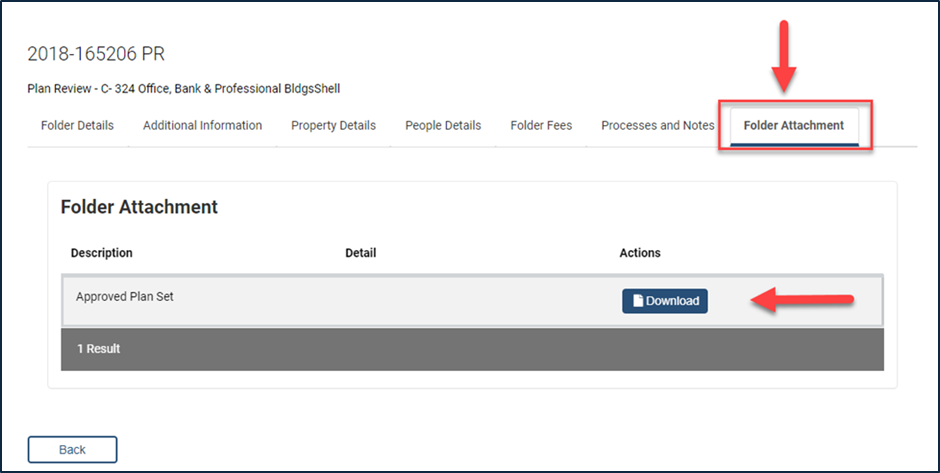
Step 4: Download Approved Plan Set
Click the "Folder Attachment" tab on the Plan Review (PR) and click "Download" to access the approved plan set.
For additional instructions on how to navigate the AB + C Portal please refer to the AB+C Manual.
Unavailable Plans
Please contact Commercial or Residential Intake if you cannot locate the plans. Staff will verify that plans are available for download on the AB+C Portal.
If a plan set is unavailable for download, please submit a Public Information Request (PIR) to retrieve the original from off-site storage. Staff will provide a cost estimate for this retrieval and will work with customers directly to send the original for copying/scanning. The reprographics company of choice will charge the customer for the copies and scans.
- How to Upload Attachments in the AB+C Portal
Supporting documentation may be required as part of your inspection. Uploading items such as surveys, photos, and engineering reports provides inspectors with the information needed to verify compliance and helps prevent delays in processing your inspection. Follow these steps after logging into your AB+C Portal account.
Step 1: Locate Permit
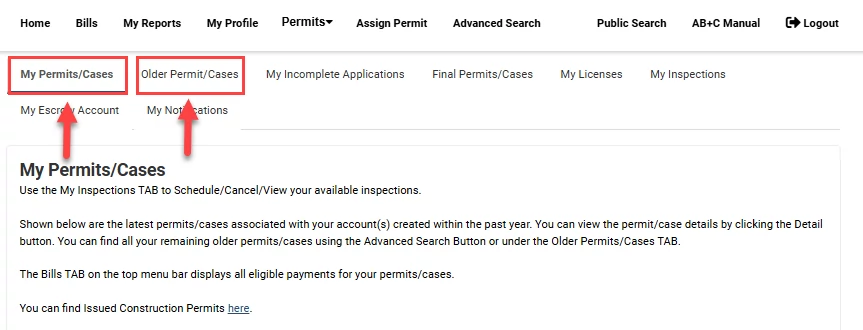
Any permits that are older than 6 months will appear under "Older Permits/Cases". Recent permits can be found under "My Permits/Cases".
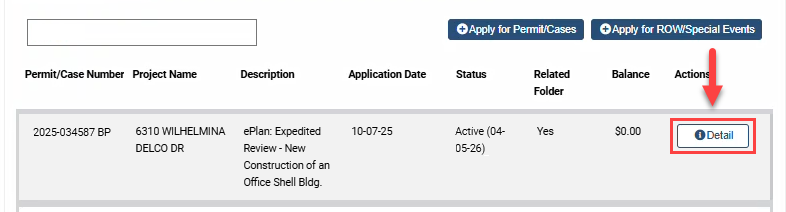
Step 2: View Permit DetailsClick the "Detail" button next to the applicable permit to open the permit record.
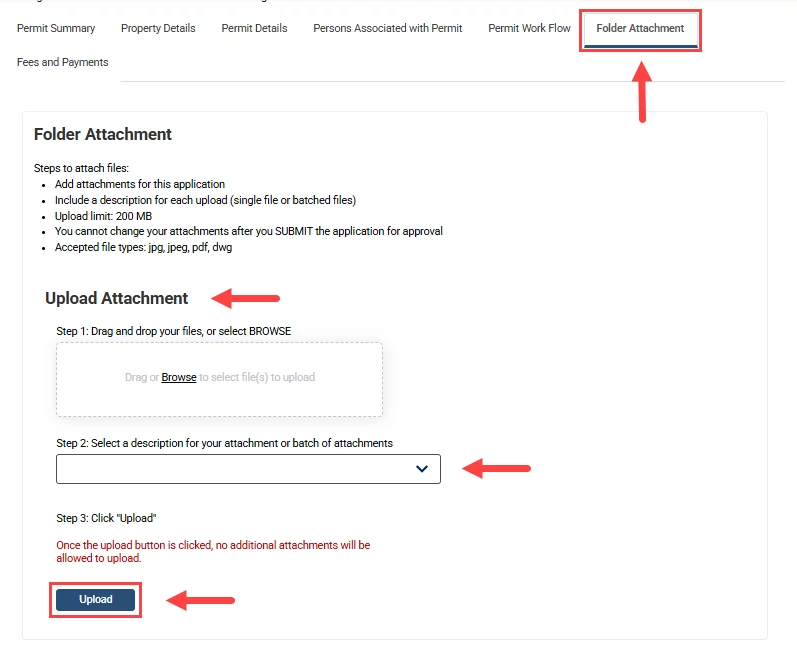
Step 3: Upload Attachment
Navigate to the "Folder Attachment" tab and follow the instructions to add your file. You can upload your supporting documents and select or write a description for the attachment.
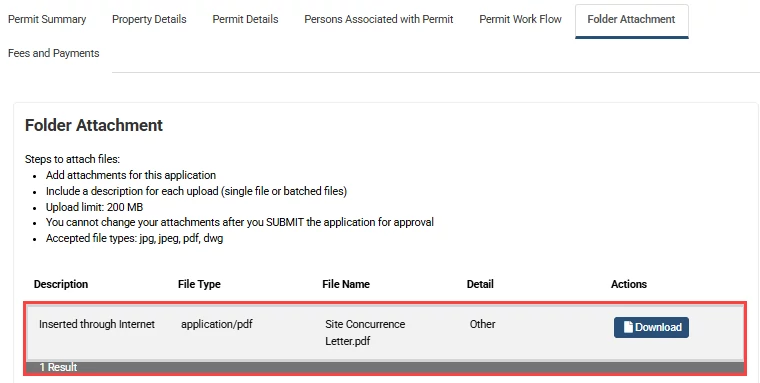
Once uploaded, the file will appear under the "Folder Attachment" tab for review.
- Code Information
The City of Austin follows the 2024 International Building Codes and the 2024 International Energy Conservation Code.
Local amendments to the International Building Codes are included in the City’s Building Technical Codes. View the Technical Codes and code interpretations for each discipline.
Building Inspection is the approval authority for all inspections regulated by the following Technical Codes:
- Commercial Building Code (International Building Code) - Applies to all structures other than one-and-two-family dwellings and townhomes and applies to construction when a building is remodeled, or there is a change of occupancy.
- Residential One-and-Two-Family Dwelling Code (International Residential Code) - Applies to all one-and-two-family dwellings and townhouses and includes mechanical, plumbing, and energy system requirements.
- Plumbing Code (Uniform Plumbing Code) - Applies to all plumbing system installations. In addition, the plumbing code also regulates natural gas installations.
- Commercial Mechanical Code (Uniform Mechanical Code) - Applies to all mechanical systems regulated by the Commercial Building Code.
- Electrical Code (National Electrical Code) - Applies to all electrical systems installed in the jurisdiction.
- The Energy Code (PDF) (International Energy Conservation Code) - Applies to all commercial and residential projects.
Appeals of code interpretations may be heard before the Building and Fire Code Board of Appeals, the Electric Board, or the Mechanical, Plumbing, and Solar Board.
Austin’s Construction and Demolition Recycling Ordinance requires affected projects to divert waste from the landfill. General contractors must reuse or recycle at least 50% of construction debris and submit a construction recycling report online when requesting the final building inspection.
For more information about codes and regulations, visit Codes, Resources, and Tools.
- Top 10 Tips for a Successful Inspection
- Verify work is complete before the scheduled inspection.
- Verify all deficiencies have been corrected for re-inspections.
- Schedule the inspection on the Austin Build + Connect (AB+C) Portal and use the Inspection Comment Tool.
- Ensure the job site is accessible and special access information is provided directly to the assigned inspector or listed on inspection request comments.
- Ensure the job site address is posted and visible from the street, including all unit's on-site identification.
- Ensure the latest city-approved plans are accessible for inspection staff.
- Ensure all required documentation is uploaded to the permit.
- Ensure all prerequisite inspections are completed before requesting a Temporary Certificate of Occupancy or final building inspection.
- Ensure someone familiar with the project is available and communicate with your inspector during the inspection.
- Review the building inspections webpage for the latest updates.
- One-Time Inspections Phone List
If you are receiving error messages in reference to one-time inspections when attempting to schedule the 112 Final Building, you will need to contact the Partner Department/Division Contact to ask them to clear the "one-time inspections" so you can schedule the 112 Final Building.
Please note: Environmental Inspections must be scheduled through the Environmental Inspections webpage. All other inspections can be scheduled by emailing or calling that department.
Inspection Type
Email
Phone
600 - EV TCO Occupancy
601 - EV TCO Stocking
617 - Landscape TCO Occupancy
618 - Landscape TCO Stocking
602 - Environmental Inspection
603 - Landscaping
Environmental Pre-Construction &
Residential Tree Inspections
environmental.inspections@austintexas.gov
Fire Department
606 - Wildland Urban Interface (WUI)
607 - Fire TCO Stocking
608 - Fire TCO Occupancy
609 - Fire
fireprevention@austintexas.gov 512-974-0153
Option 3Austin Water
610 - AW Temp Utilities
611 - Water Tap
612 - On-Site Sewage Facility Inspections (OSSF)
625 - Auxiliary Water Inspection
AW Water Conservation Irrigation Inspection
Charles.Deatherage@austintexas.gov
AWIrrigationInspection@austintexas.gov512-972-1000
Option 3
Austin Public Health
(located at RLC, 1520 Rutherford Ln)613 - Health TCO Stocking
614 - Health TCO Occupancy
615 - Health Inspections
APHPlanReview@austintexas.gov 512-974-3325 Atmos Energy 888-286-6700
Emergency:
866-322-8667Centerpoint Energy servicepermit@centerpointenergy.com Texas Gas Services 866-206-9587 - How to Prevent a Permit from Expiring
Visit the Modify a Permit webpage to learn more about reactivating an expired permit, withdrawing an active or pending permit, and extending the expiration date of an active permit.
Commercial
- Commercial Special Inspection Process
A Statement of Special Inspections form must be completed for projects submitted after February 13, 2017. In addition, a field folder will be issued with the permit when a special inspection is required. The field folder must be kept on-site at all times and include a special inspection log and other forms to be completed by the special inspector/testing agency.
- Commercial Process Flowcharts
- Commercial Building Inspection Flowchart (PDF)
- Commercial Mechanical Inspection Flowchart (PDF)
- Commercial Plumbing Inspection Flowchart (PDF)
- Commercial Electrical Inspection Flowchart (PDF)
- Tree Protection and Erosion/Sedimentation Controls Flowchart (PDF)
- Temporary Certificate of Occupancy Process Flowchart (PDF)
- Commercial Inspection Checklists
- Building Final (PDF)
- Building Framing (PDF)
- Building Insulation (PDF)
- Building Interior Wallboard (PDF)
- Building Layout/Foundation (PDF)
- Building Pre-Construction (PDF)
- Building TCO (PDF)
- Electrical Final (PDF)
- Electrical Grounding (PDF)
- Electrical Multifamily Dwelling Permanent Power Checklist (PDF)
- Electrical Rough (PDF)
- Electrical Slab (PDF)
- Electrical TCO (PDF)
- Electrical Temporary (PDF)
- Mechanical Cooler/Freezer Rough (PDF)
- Mechanical Final (PDF)
- Mechanical Rough (PDF)
- Mechanical Stove Hood Rough (PDF)
- Mechanical TCO (PDF)
- Mechanical Temporary Gas (PDF)
- Mechanical Vent (PDF)
- Multifamily Dwelling Permanent Power (PDF)
- Plumbing Final (PDF)
- Plumbing Fire Line Rough (PDF)
- Plumbing Gas Rough (PDF)
- Plumbing Gas Yard Line (PDF)
- Plumbing Interior Water Lines (PDF)
- Plumbing Pre-Pour (PDF)
- Plumbing Rough (PDF)
- Plumbing Sewer Yard Line (PDF)
- Plumbing TCO (PDF)
- Plumbing Temporary Gas (PDF)
- Plumbing Top-Out (PDF)
- Plumbing Water Yard Line (PDF)
- Commercial Building Inspector Phone List
If you have an active permit, you can contact:
- Your assigned Building Inspector to share details like the gate or lock box code and when you plan to arrive.
- The Inspection Supervisor if you have questions about building codes.
For general building and permit-related questions, please contact the following divisions:
Visit the Contact Austin Development Services webpage to view live chat hours.
Find Your Inspector - search by address, find inspectors and contact information.
Commercial | Administration | Right of Way (ROW)
Commercial Building Inspectors
Name
Email
Phone
Joshua Williams - Supervisor joshua.williams3@austintexas.gov 512-665-0400 Tannen Andrews tannen.andrews@austintexas.gov 737-262-2288 Jack Garcia jack.garcia@austintexas.gov 512-264-5106 Scott Roberts scott.roberts@austintexas.gov 512-552-7484 Matthew Santiago matthew.santiago@austintexas.gov 512-940-6463 Commercial Plumbing Inspectors
Name
Email
Phone
Chad Watson - Supervisor chad.watson@austintexas.gov Office: 512-974-2946
Cell: 512-228-6146Phillip Cantrell phillip.cantrell@austintexas.gov 512-577-9501 Aaron Hibbs aaron.hibbs@austintexas.gov 512-264-4013 Michelle Riffe michelle.riffe@austintexas.gov 512-299-3857 Jason Samsel jason.samsel@austintexas.gov 512-300-9823 Philip Sughrue philip.sughrue@austintexas.gov 512-293-6300 Don "Kyle" Welch don.welch@austintexas.gov 512-545-3521 Commercial Mechanical Inspectors
Name
Email
Phone
Charles Ablanedo - Supervisor charles.ablanedo@austintexas.gov Office: 512-974-9027
Cell: 512-665-1581Leonard Gonzales leonard.gonzales@austintexas.gov 512-299-7179 Jonathan Herrin jonathan.herrin@austintexas.gov 512-999-2419 Joshua Ojeda joshua.ojeda@austintexas.gov 512-705-3927 Commercial Electrical Inspectors
Name
Email
Phone
Hyatt Dunn - Supervisor hyatt.dunn@austintexas.gov Office: 512-978-6402
Cell: 512-226-3396Keith Cameron keith.cameron@austintexas.gov 512-554-9685 Martin Johnsen martin.johnsen@austintexas.gov 512-366-0546 Dan Kiser dan.kiser@austintexas.gov 512-903-8919 Tim York timothy.york@austintexas.gov 512-905-1749 Commercial Division Manager
Name
Email
Phone
Marty Starrett - Manager martin.starrett@austintexas.gov Office: 512-974-3488 Inspection Administration
Name
Email
Phone
Rick Arzola - Business Process Specialist rick.arzola@austintexas.gov Office: 512-974-2417
Cell: 512-550-5836Gloria Alvarado - Business Process Specialist gloria.alvarado2@austintexas.gov Office: 512-978-4646
Cell: 512-264-4842Right of Way (ROW)
Name
Email
Phone
Right of Way Division rightofway@austintexas.gov 512-974-7828 - Commercial Appointments and Contact
Appointments are available with the Commercial Building Inspections team for commercial and multi-family (more than 2 units) properties to answer questions regarding building inspections for an active permit.
Appointment Name
Description
Make an Appointment
Building Inspections General Questions (15 min)
Ask general questions about the commercial building inspection process for an active permit.
Technical Inspection Questions
Email the appropriate contact for technical inspection questions on an active permit. (No appointment needed.)
Building - joshua.williams3@austintexas.gov
Mechanical - charles.ablanedo@austintexas.gov
Electrical – hyatt.dunn@austintexas.gov
Plumbing - chad.watson@austintexas.gov
Residential
- Residential Process Flowcharts
- Residential Inspection Checklists
- Building Final (PDF)
- Building Foundation (PDF)
- Building Framing (PDF)
- Building Insulation (PDF)
- Building Layout (PDF)
- Building TCO (PDF)
- Building Wallboard (PDF)
- Electrical Final (PDF)
- Electrical Ground (PDF)
- Electrical Rough (PDF)
- Electrical Slab (PDF)
- Electrical Temporary (PDF)
- Fire-Resistance-Rated Construction (PDF)
- Mechanical Final (PDF)
- Mechanical Rough (PDF)
- Plumbing Final (PDF)
- Plumbing Rough (PDF)
- Plumbing Sewer Yard Line (PDF)
- Plumbing Top-Out (PDF)
- Swimming Pool and Spa (PDF)
- Residential Building Inspector Phone List
If you have an active permit, you can contact:
- Your assigned Building Inspector to share details like the gate or lock box code and when you plan to arrive.
- The Inspection Supervisor if you have questions about building codes.
For general building and permit-related questions, please contact the following divisions:
Visit the Contact Austin Development Services webpage to view live chat hours.
Find Your Inspector - search by address, find inspectors and contact information.
Residential | Administration | Right of Way (ROW)
Residential Inspections - Northwest Austin Territory
Name
Email
Phone
Niko Lanzi - Supervisor niko.lanzi@austintexas.gov 512-574-8049 Victor Acquarola victor.acquarola@austintexas.gov 512-363-0772 Gerard Ambrose gerard.ambrose@austintexas.gov 512-584-3149 Mike Franke mike.franke@austintexas.gov 512-203-3662 Felicia Milligan felicia.milligan@austintexas.gov 737-231-6292 Frank Nanyes frank.nanyes@austintexas.gov 512-599-7705 David Perez davidc.perez@austintexas.gov 512-457-1820 Jim Richerson jim.richerson@austintexas.gov 512-571-7930 Residential Inspections - Northeast Austin Territory
Name
Email
Phone
Patrick Wheeless - Supervisor patrick.wheeless@austintexas.gov 512-905-1403 Anthony Andrews anthony.andrews@austintexas.gov 512-545-3441 Brandon Huerta brandon.huerta@austintexas.gov 512-645-7917 Derek Jacob derek.jacob@austintexas.gov 512-203-3596 Bob Reed bob.reed@austintexas.gov 737-240-1866 Noe Rodriguez noe.rodriguez@austintexas.gov 512-574-2543 Residential Inspections - Southwest Austin Territory
Name
Email
Phone
Joey Martinez - Supervisor joey.martinez@austintexas.gov 512-545-3154 DeeAnn Afra deeann.afra@austintexas.gov 512-351-2631 Karaan Guillory karaan.guillory@austintexas.gov 512-436-1062 Sean McMullen sean.mcmullen@austintexas.gov 512-774-2872 Jimmy Patina jimmy.patina@austintexas.gov 512-460-0997 Robin Quick robin.quick@austintexas.gov 512-457-1003 Levi Singleton levi.singleton@austintexas.gov 512-521-4922 Residential Inspections - Southeast Austin Territory
Name
Email
Phone
Charles MacConnell - Supervisor charles.macconnell@austintexas.gov 512-647-8034 Stein Antonsson steinberg.antonsson@austintexas.gov 512-228-8196 Colby Gary colby.gary@austintexas.gov 512-560-4626 Ralph Martinez ralph.martinez@austintexas.gov 512-665-0177 Hector Nava hector.nava@austintexas.gov 512-850-0843 Grant Neeley grant.neeley@austintexas.gov 512-287-1824 Ryan Palumbo ryan.palumbo@austintexas.gov 512-203-2178 Adrian Rios adrian.rios@austintexas.gov 512-771-9514 Residential Division Manager
Name
Email
Phone
Scott Cochran - Manager scott.cochran@austintexas.gov Office: 512-974-2729 Inspection Administration
Name
Email
Phone
Rick Arzola - Business Process Specialist rick.arzola@austintexas.gov Office: 512-974-2417
Cell: 512-550-5836Gloria Alvarado - Business Process Specialist gloria.alvarado2@austintexas.gov Office: 512-978-4646
Cell: 512-264-4842Right of Way (ROW)
Name
Email
Phone
Right of Way Division rightofway@austintexas.gov 512-974-7828 - Residential Appointments and Contact
Contact Us
For general questions, please email us at building.inspections@austintexas.gov.
Appointments
Appointments are available with the Residential Inspections team for single-family, townhouse, duplex, two-unit, and three-unit residential properties to answer questions regarding building inspections for an active permit. For properties with more than four units, check out the commercial building inspections appointments.
Appointment Name
Description
Make an Appointment
Residential Building Inspection Questions (30 min)
Ask general questions about the residential building inspection process for an active permit.
Residential Mechanical/Electrical/Plumbing (MEP) Inspections Questions (30 min)
Ask technical inspection questions related to residential building, plumbing, electrical, and mechanical code requirements for an active permit.