
Trees on Residential Property
Regulated trees in Austin require a permit to remove or impact. You will need a Tree Ordinance Review Application (TORA) if your project requires you to:
- remove the tree,
- prune 25% or more of the canopy,
- and/or start an activity that may impact a tree or cause a disturbance to the critical root zone.
What you will find on this page:
- Identify regulated trees on your property
- Determine whether a building permit is required
- Apply for permits and AIA Austin Tree Survey Samples
- How to schedule an on-site Pre-plan Submittal Consultation
- Small Tree Fee Credit Pilot Program - NEW
- How to check permit status
- How to schedule a tree inspection
- Step 1: Identify regulated trees on your property
Before beginning your project, note any trees on or near your worksite and determine whether they are regulated. Protected and Heritage Trees are regulated on residential property.
How to Measure a Tree
Use a flexible tape measure to measure the circumference (around the tree) at 4.5 feet above the ground. Divide the circumference by 3.14 to get the diameter.
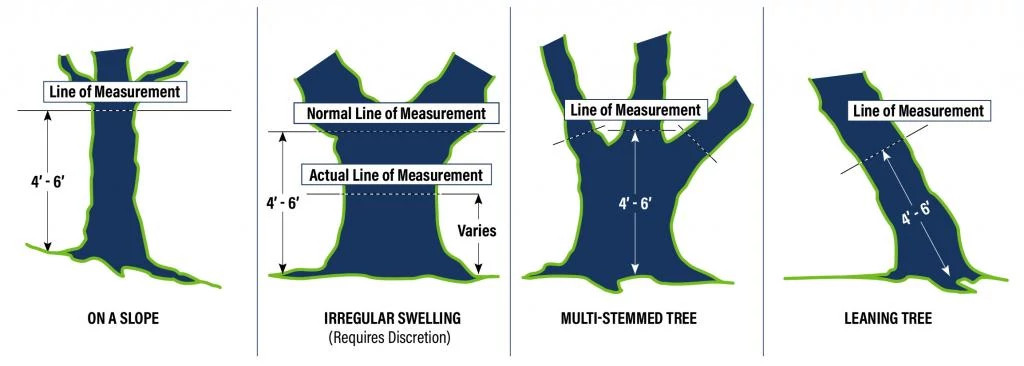
- If the tree is on a slope, measure 4.5 feet above grade from the high side of the slope.
- If the tree has irregular swelling in the trunk, measure 4.5 feet above grade above or below the swell(s).
- If the tree is multi-stemmed:
- Measure all the stems at 4.5 feet above grade.
- Take the largest stem diameter, and add it to half of the subsequent stem diameters.
For example, A Cedar Elm has two stems measuring 18 inches and 16 inches at 4.5 feet above grade. The larger stem is 18 inches, so take half of the subsequent stem diameter (16 inches / 2 = 8) and add it to the largest stem measurement. Calculate multi-stem diameter: 18 inches + 8 inches = 26-inch diameter.
- If the tree is a leaning tree, measure at 4.5 feet above grade within the center area of the leaning tree.
Trees less than 19 inches in diameter are not regulated on residential property. Although you won’t need a Tree Ordinance Review Application (TORA) to remove or work near these trees, your project may still require other permits. Learn about work exempt from building permits.
Digging Into Critical Root Zones
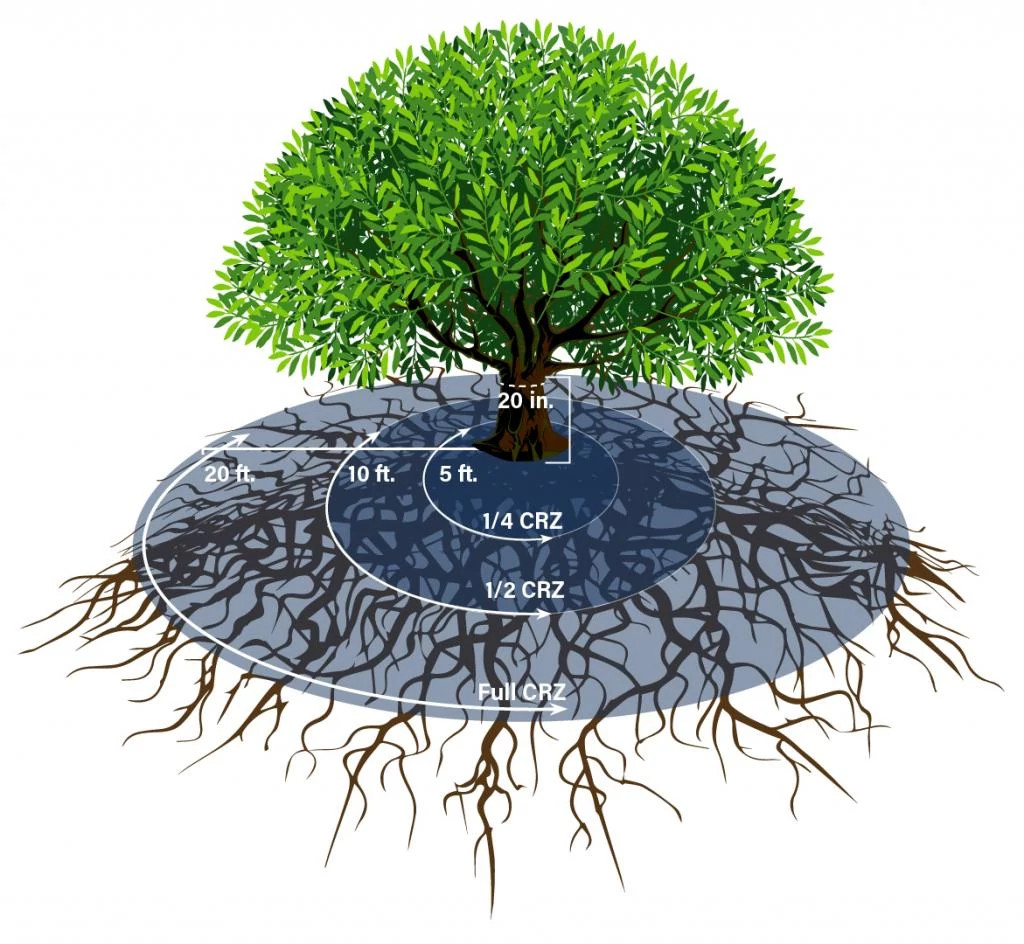
The Critical Root Zone varies with the size of its tree trunk. Any disturbance within the critical root zone has the potential to harm or kill a tree, particularly in combination with other impacts. Impacts can include disturbances to inches underground, such as soil compaction from construction equipment and grade changes.
The Critical Root Zone
In this example, the critical root zone extends 20 feet from the base of the tree. You can dig into the ground in the outer half of the critical root zone (in this example: between 10 and 20 feet from the base of the tree or the green zone).
1/4 Critical Root Zone
No impacts are allowed.
1/2 Critical Root Zone
No cut or fill greater than 4 inches.
Full Critical Root Zone
50% of the ground within this area must be preserved without impact.
Read the full Tree and Natural Area Preservation requirements, Section 3 of the Environmental Criteria Manual.
- Step 2: Determine whether a building permit is required
In many cases, a Tree Ordinance Review Application (TORA) is completed as part of another permit application. Once you have determined that you do have regulated-size trees on or near your worksite, you should determine whether your project requires a building or other permit. Learn more about Residential Building Plan Review and permitting.
- Step 3: Apply for your permit(s)
Use the Residential Tree Review Checklist (PDF) and AIA Austin Tree Survey Samples (PDF) to help ensure your application is complete, and your project complies with tree preservation standards.
If your project requires a building or other permit, use our interactive Residential Intake Request Form to submit your application. Be sure to complete the tree review section of the permit application and answer “yes” when asked about Protected trees on the property.
If your project does not require any other permits (i.e., the full scope of the proposed work is covered by the Work Exempt from Building Permits list), follow these steps to complete a standalone Tree Ordinance Review Application (TORA) through the Austin Build + Connect (AB+C) Portal.
Step 3.1: Register and Log In
You must be a registered AB+C Portal user. If you do not have an account, you can create one online on the AB+C Portal website. Once you are registered, sign in.
Step 3.2: Select Permit Type
Click Permits at the top of the page and select Apply for Permits/Cases from the drop-down menu.

Select Application Type Tree Ordinance Review Application, Sub Type T.O.R.A, Work Type Residential, then click Continue.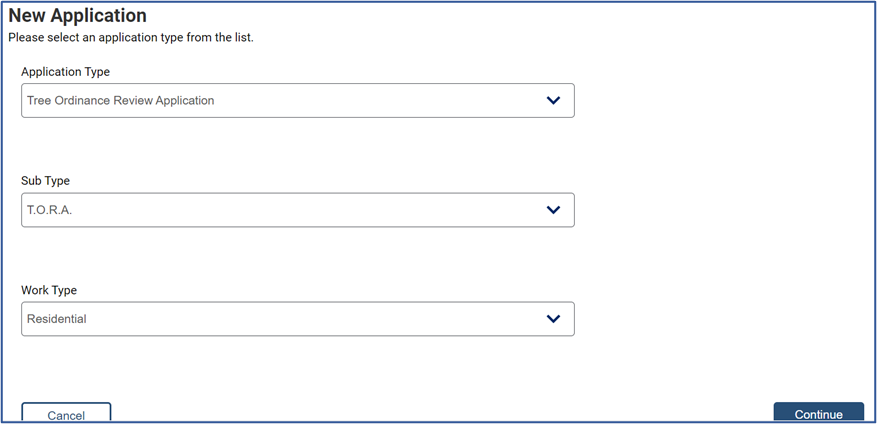
Select the correct Applicant Name from the drop-down menu and complete the Folder Description field. Include as much detail as possible about tree condition, project summary, and possible tree impacts. Select Continue.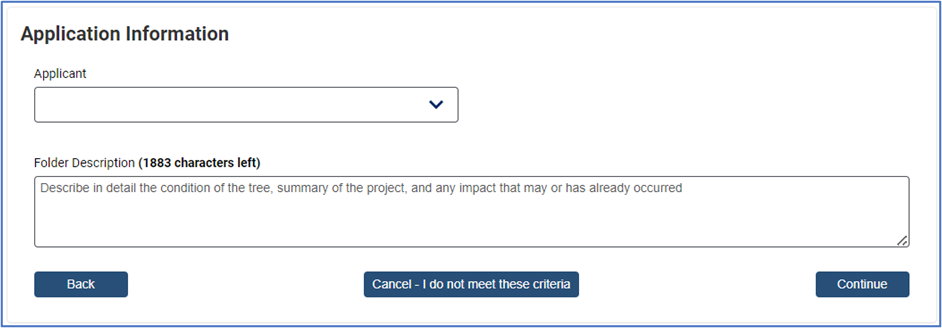
Step 3.4: Property Search and SelectSelect the address from the Address Type drop-down menu. Enter the house number and street name in the Street/Segment Number AND Street Name field. Do not include the street type (drive, road, circle, etc.). Click Search. Select the appropriate address from the search results that populate by clicking the Select button next to it. Scroll down and select Continue.
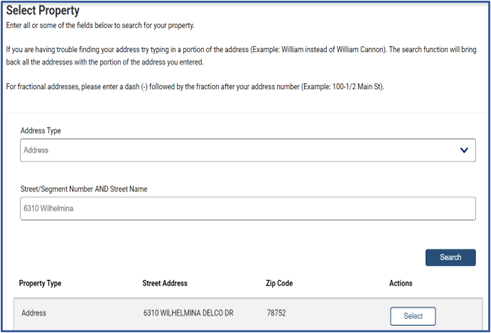
Search tips:- Try typing a portion of the address
- William instead of William Cannon
- Do not enter street type
- Road, Drive, Circle, Street, etc.
- Use highway abbreviations
- IH 35, FM 2222, US 183, etc.
- Include the number and suffix
- 1st, 2nd, 5th, etc.
- If your address is not showing up, confirm with 9-1-1 Addressing that it is correctly registered by calling 512-974-2797.
Step 3.5: Additional Information
Select Non-Development Related for the Type of Application and choose the most appropriate option from the drop-down menu for the Type of Work.
Type of Work
Code Violation Related Inspector issued a code violation, and site requires a tree permit Dead, Diseased, Imminent Hazard Tree is declining beyond treatment or imminent hazard to life or property Not Construction Related but Impacts Regulated Trees Project does not require a building permit but may impact regulated trees. Do I Need a Permit is a 5-minute interactive tool to help verify the type of permit you need Pre-Plan Submittal Development Consultation Optional, on-site meeting to discuss development plans. Applicant must be the owner or provide an authorization document from the owner Utility Repair Replacement Repair or replacement of sewer, water, or other utility line
Note: Do not select ‘Residential Dev Plan Review – Tree’ nor ‘Site Plan Exemption Related’. Tree Review for these projects is done within the Residential Plan Review and Site Plan Exemption processes, respectively.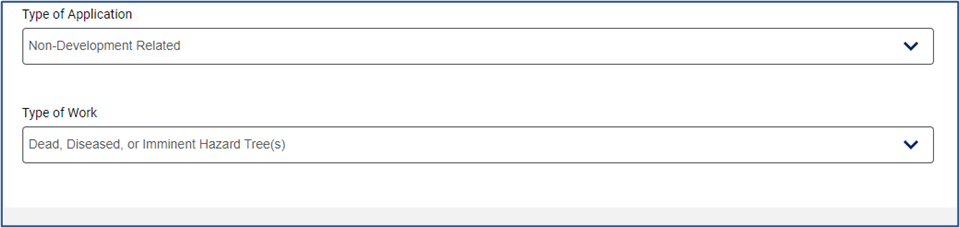
Complete the remaining Tree Information fields and click Continue.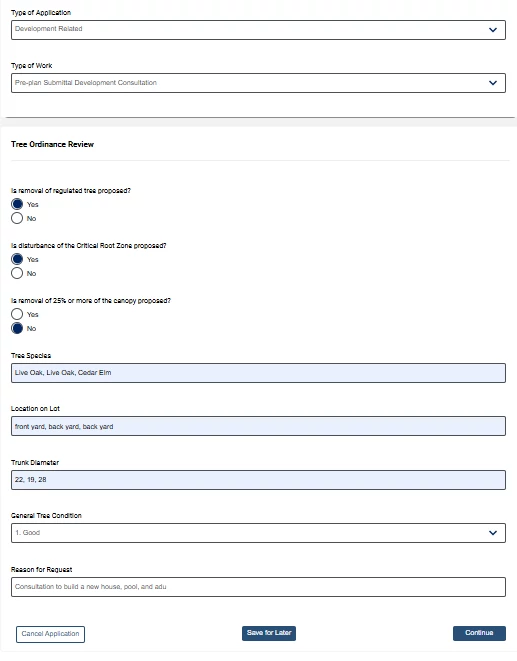
Identify if the tree is regulated: How to Measure a Tree
*Submitting Multiple Trees: You may list more than one tree in the species and diameter fields
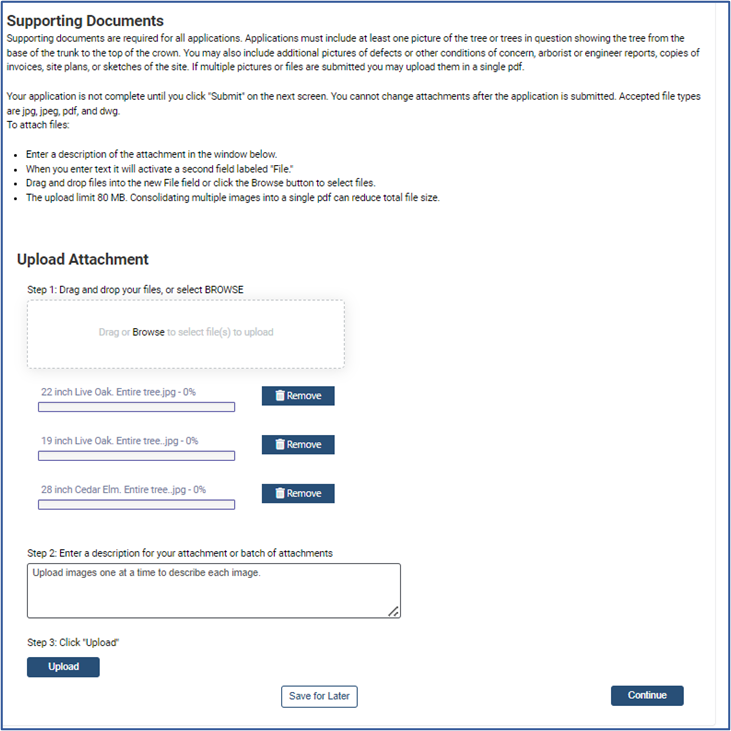
- Provide the species of each tree. (Ex: Live Oak, Live Oak, Cedar Elm)
- Provide the diameter of each tree in corresponding order to tree species (Ex: 22, 19, 28)
- Provide an image of each tree that shows the entire tree from root to crown. Label each image by species and diameter.
Step 3.6: Supporting Documents
Upload images and supporting documents. Include a sketch of the proposed work and a photo of the impacted tree from root to canopy.
Type of Review Initial Required Documents Upon Submittal Dead, Diseased, Imminent Hazard (DDI) Image of tree
- Close-up of defect
- Entire tree from root to crown
*Large, clear, good lighting
Utility Repair/Replacement Plans/image/sketch showing regulated trees, house, street, route of trench work, canopy pruning plan (if applicable), and original and proposed utility lines Not Construction Related but Impacts Regulated Trees Image of tree, plans, detail, or sketch of possible tree impacts Code Violation Related All documentation, including notices, images, and correspondence with staff related to the case Pre-Plan Submittal Development Consultation Residential – conceptual plans or sketch of proposed development
Commercial – conceptual plans, tree survey
Select Browse to locate your documents; type a description of the document in the description field. Click Upload. Successfully uploaded documents will then populate at the top of the page where you can download or delete as necessary. Select “Continue” when all documents are uploaded.
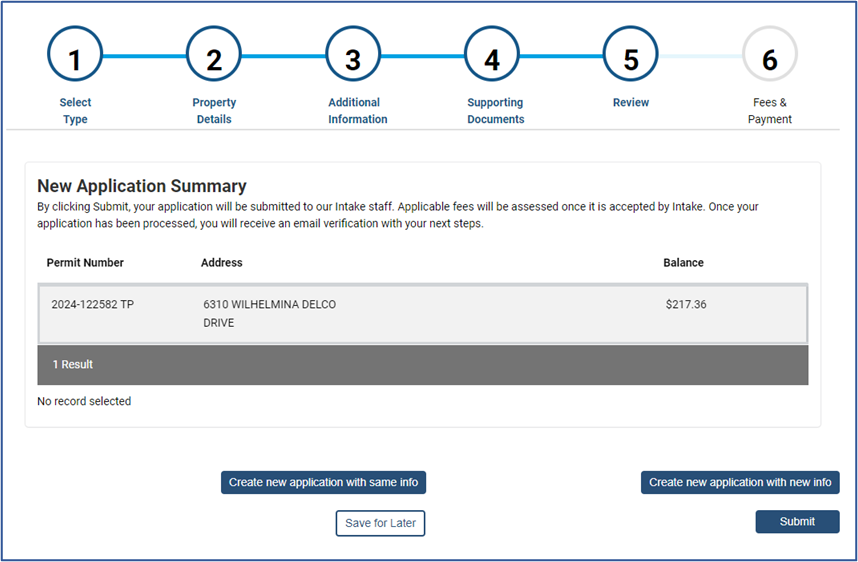
Step 3.7: Review Application Information and Submit
This screen shows a summary of your application and fee amount. Fees will not be payable until your application passes a completeness check. Qualifying applications will automatically have the fee waived after the completeness check. Click Submit.
You will receive an email confirming that your application was successfully submitted.
When your application passes a completeness check, its status will be listed as “In Review” in the My Permits/Cases section of the AB+C Portal. A tree reviewer will be assigned to your application, and your review may take up to 10 business days.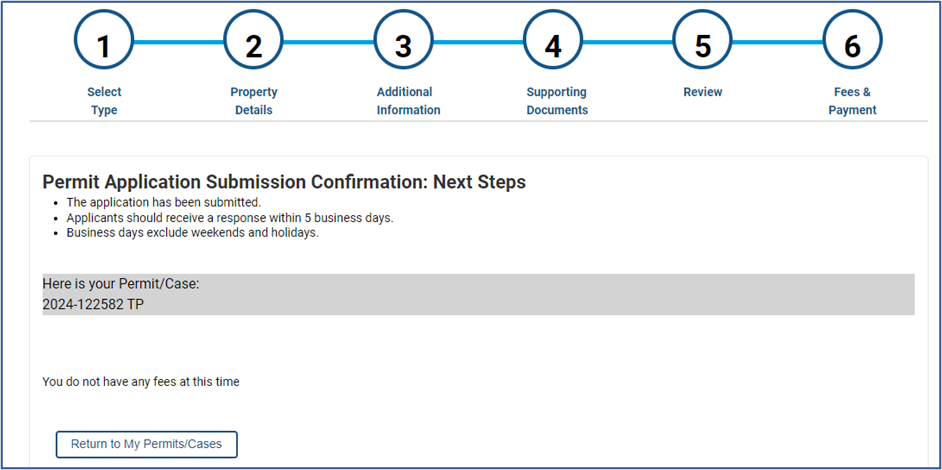
DenialIf your application is denied, the tree permit will show as “Awaiting Update” in the My Permits/Cases section of the AB+C Portal. Your tree reviewer will email you directly with comments and instructions for making corrections.
Approval
If/when your application is approved, the tree permit status will show as “Active” in the My Permits/Cases section of the AB+C Portal. You can access the official tree permit under My Permits. Any specific conditions of the permit, including whether any inspections are required, will be written directly on the permit.
- Try typing a portion of the address
- Optional: How to schedule an on-site Pre-plan Submittal Consultation
If your work impacts regulated trees, you can request a paid Pre-plan Submittal Consultation. View the Tree Review & Inspection Fee Schedule (PDF) for the Tree Pre-Development Consultation fee. In this consultation, staff will review codes and rules, identify which trees must be preserved or mitigated, and discuss any variances. Only the property's registered owner/owner's agent may request a Pre-plan Submittal Consultation.
Follow the steps in the Apply for your permit(s) section to request a Pre-plan Submittal Consultation through the Austin Build + Connect (AB+C) Portal.
- Select the Type of Application, "Development," and for the Type of Work, select “Pre-plan Submittal Development Consultation.” Continue with the remaining steps.
- A concept plan is required to pass the completeness check. Please upload your plan on the Supporting Documents screen.
- The final screen will show a summary of your application and fee amount. Fees will not be payable until your application passes a completeness check. Click “Submit.”
- You will receive an email confirming that your application was successfully submitted. When your application passes a completeness check, you will receive an email notification with instructions on how to schedule your consultation.
- Small Tree Fee Credit Pilot Program - NEW
The Small Tree Fee Credit incentivizes the preservation of trees with a diameter less than 19” on single-family lots to ensure they are kept safe during construction. The credit offsets qualifying development fees in exchange for preserving small trees. Enrolled trees must be treated as regulated trees and meet preservation criteria at the end of the project in order to receive the credit. The pilot has a limited number of total credits that will close once the program cap is reached. Applications claiming the Small Tree Fee Credit will not be accepted after May 28, 2027.
What is a small tree?
A small tree is a tree with a diameter of 1” or greater but less than 19”.
Does my tree qualify?
A small tree may be enrolled in the STFC if it meets the following criteria:
The tree is on a lot zoned single-family.
The tree is on a lot where a new residence is being constructed. Remodels, additions, and non-residential structures do not qualify for the credit.
The tree meets the Qualifying Trees criteria listed in Environmental Criteria Manual (ECM) 3.5.4.B.2.a.
The tree is not preserved for mitigation credit per ECM 3.5.4.B.2.
Construction Requirements
Small trees must be surveyed and depicted on plans in accordance with the requirements for regulated trees. Trees must be identified with a plan note, notation on a tree list, or otherwise graphically differentiated by a method identified on the plan legend. To qualify for the credit, trees must meet standard preservation criteria.
Small trees must be protected throughout construction in accordance with the requirements for regulated trees. Trees must meet preservation criteria at final inspection.
Small trees are addressed identically to regulated trees with the following exceptions:
Reinspection - Unapproved impacts and deficiencies in protection are noted on inspection reports, but do not trigger a reinspection or reinspection fee. The builder is responsible for demonstrating compliance with preservation criteria. Documented deficiencies and corrective measures will be assessed at the end of the project to determine if preservation criteria have been met.
Opt-out - A builder may opt any enrolled tree out of the Small Tree Fee Credit at any time for any reason. A plan revision is required to update the plans and the enrolled credit.
How to Apply
Step 1: Gather required documents
Tree Survey including all trees proposed for enrollment in the Small Tree Fee Credit Program.
Small Tree Fee Credit Calculation Table - Complete the Small Tree Fee Credit calculation table and include it as a plan note. Refer to page 3 of the Small Tree Fee Credit Enrollment Form for an example. Adjust the table so each enrolled tree appears on a separate row. Regulated trees or small trees preserved for mitigation should not be included in this table.
Step 2: Select "Yes" to Opt In
Select “Yes” to “Are you enrolling in the Small Tree Fee Credit Program?” question on the Apply for a New Construction or Addition Building Permit web form. Answering yes triggers a tree review (including review fees) even if there are no regulated trees on the lot.
Step 3: Upload Enrollment Form
Upload the enrollment form when prompted and complete the remainder of the Apply for a New Construction or Addition Building Permit web form. Include the tree survey and calculation table with the plans that are submitted with the building permit application.
Receiving the Credit
Enrolled trees will be evaluated during the final tree inspection to determine whether they meet preservation criteria. If an enrolled tree does not meet preservation criteria, a plan revision will be required to update plans and the amount of the enrolled credit. The builder will be provided a questionnaire to evaluate their experience with the Small Tree Fee Credit. Once we receive the questionnaire and the final inspection passes, we will issue a refund equal to the credit value of all enrolled trees that were successfully preserved.
If multiple building permits are associated with the original permit application and the building permits pass their final tree inspections at different times, the Small Tree Fee Credit refund will be issued after the last final tree inspection is passed.
Credits will be issued to the original payee based on the original payment method and timing. Reimbursements may be processed to the original credit card or ACH, or issued by check. When the total credit is less than the total of the qualifying fees, the credit will be applied to the most recent fees paid first.
Applicants will be notified during the review process if the funds allocated to the Small Tree Fee Credit program have been exhausted.
Questions?
Program questions: Email Daniel Priest
Application and refund questions: Email Nina Jackson
- How to check permit status
- Log in to your Austin Build + Connect (AB+C) Portal account.
- Click My Permits/Cases.
- Review the Status column of the permit you are checking on.
- How to schedule a tree inspection
- Log in to your Austin Build + Connect (AB+C) Portal account.
- Click My Inspections.
- The next screen shows a list of permits with available inspections.
You can also schedule an inspection by phone at 512-974-9405. You will need to provide your PIN, Permit Number, and Inspection Code. Learn more about scheduling inspections.
Appointments
Appointments are available with the City Arborist team for general questions related to Tree Ordinance compliance on zoning, site plan, subdivision, and residential projects, including site plan exemption and site plan correction (for projects not yet submitted).
This informal discussion is not for on-site visits or field assessments of your project, and formal permit documentation will not be provided or processed during this appointment.
Appointment Name | Description | Make an Appointment |
|---|---|---|
Tree Ordinance Compliance General Questions (20 min) | Ask general questions about Tree Ordinance compliance for zoning, site plan, subdivision, and residential projects, including site plan exemptions and corrections for projects not yet submitted. | |
Pre-Plan Submittal Consultation, On-Site Visits | Get an optional, fee-based on-site visit from a City Arborist before submitting plans by submitting a Pre-Plan Submittal Consultation application. | To request a consultation or learn more, visit Trees on Residential Property or Trees on Commercial and Multi-Family Property. |
Schedule Environmental / Tree Inspections: To schedule inspections for an Active building permit, visit Environmental Inspections.
Red Tag / Stop Work Order: To understand why a red tag or stop work order was issued for a site, contact the assigned Environmental Inspector or email Environmental.Inspections@austintexas.gov.
Check status of review & discuss comments: For plans currently in review, please contact your assigned tree reviewer directly or learn how to check the status and more at Tree Reviews and Permitting.